User Administration
One of the primary ways information is organized in the Uplevel Dashboard is based on the teams of people that work together. On a recurring basis, Uplevel imports an updated Org Chart, with information about each individual’s current manager, and other custom properties about individuals such as report group, department, or region.
However, Admins are able to make real-time edits to this information without having to wait for the next full Org Chart update. It is possible to move an individual to a different team, or correct other properties about an individual to help ensure that any Segments based on these properties are up to date.
Key Features
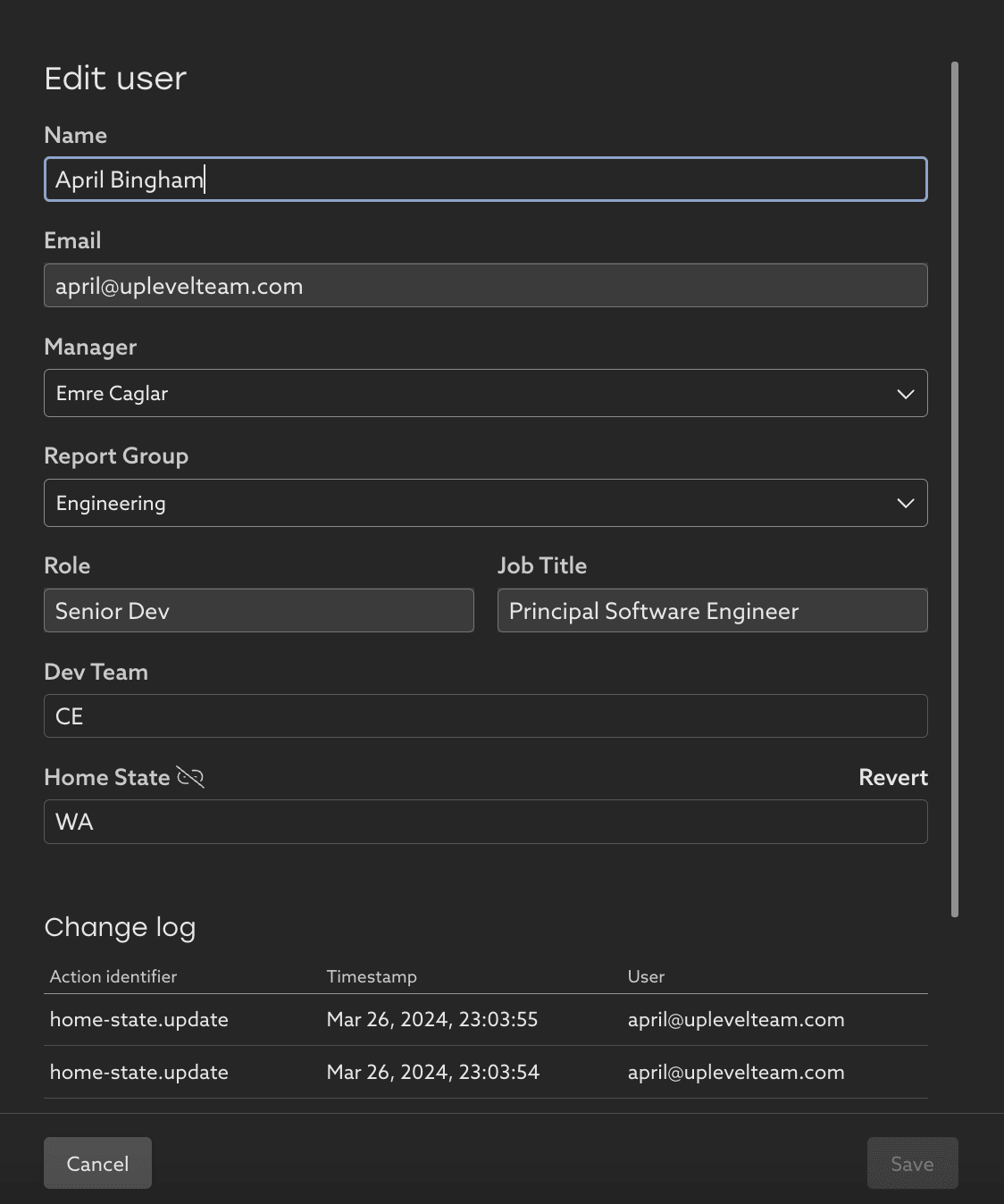
Viewing and updating properties:
- In the User Management page, all the current properties about individual and their managers are listed. To make a change, click on an individual row.
- Name, Manager, and other custom properties about an individual can be edited.
Reorgs & moving an individual between teams:
- Update the Manager field to move an individual to a different location in the org chart tree. This will update which team an individual appears in when filtering by Manager, or when viewing the entire tree who report up to a leader.
Updates remain in place, even after a new Org Chart file is imported:
- Any manual fixes applied here will stay in place even if a new Org Chart is ingested. In the UI, these updates are indicated with an “unlinked” icon, showing that this field is not currently linked to the value in the latest Org Chart.
- To discard an edit, and have the property reflect what’s in the Org Chart going forward, click Revert on that field.

- Admin permissions:
- This User Administration UI can be made available to anyone (as appropriate) at the organization. Please contact support for assistance in updating who has access to the Admin UI.
- Adding / removing users:
- At this time it is not possible to add a new individual to the organization through this UI. Contact support and we will help coordinate brining in new users and updating the data feeds to collect their activity data.
- Promoting to Manager or changing Role:
- If an IC is promoted to a manger and begins leading a team, that change will appear with the next regular Org Chart ingestion. Contact support to make a change prior to that org chart refresh.
Contact support@uplevelteam.com for assistance with other updates.
Related Articles
How to create a custom segment
Save a group of people as a segment to focus on their data By default, Uplevel shows data about everyone in your organization, but offers a list of default segments you can pick from to see more detailed groups. Let's create a custom segment with ...How to set a metric target
Set targets for metrics and teams to help drive change in your org. Targets can now be set on any key insights directly within the dashboard. This feature is designed to empower every team to actively participate in setting goals and tracking ...How to explore your data with "Group by" options
Insights data can be pivoted by key properties in order to view differences between groups. Imagine that Uplevel insights show a high-level trend across all the people in your selected segment. Clicking into the details provides a Table view with ...How to use Uplevel to find velocity opportunities
The first step towards increasing velocity is finding where your biggest opportunities lie. There are a variety of venues through which opportunities in velocity can be found. Note that affecting/changing velocity comes later, and can be explored in ...PR Cycle Time
Understand the flow of a PR from commit to merge PR Cycle time measures the median time your Pull Requests are in three different stages: Dev, Waiting, and Review. Phase 1: Dev The first phase looks at how long the particular PR was in development. ...