Deep Work

Uplevel categorizes your team's work into two buckets:
Development time - consists of deep work and fragments. Optimized development time consists of as little fragments as possible.
Non-development time - The various types of meetings and interruptions in Slack that pull your developers away from their most important work.
Development Time
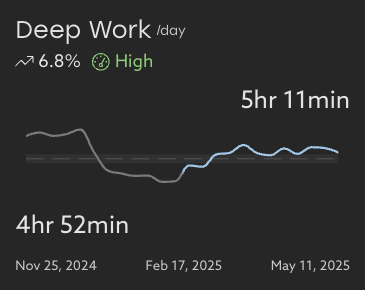
Deep Work Trend
Understand your organization's Deep Work baseline by taking a look at your trends over time. This chart shows you the average time your developers have to focus each day over the selected time range, compared to the equal amount of time prior.
This view makes it easy to spot dips which could correlate to an increased burnout risk.
Non-Development Time
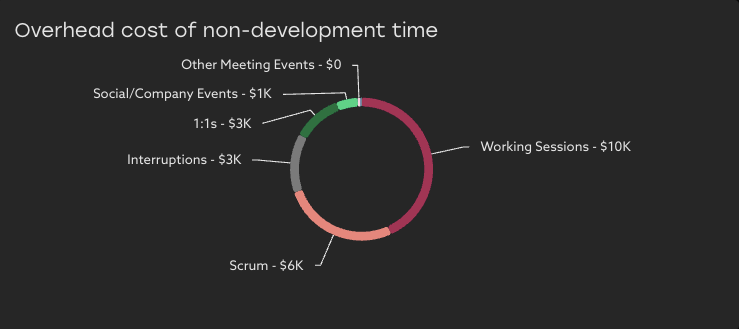
Cost Breakdown
Uplevel uses estimated allocation costs to surface the cost of non-development time for the selected time period. Costs can be a finer-grained method to prioritize the optimization of non-development time, since it takes into account the varying levels of personnel involved in a given activity.
You can learn more about how Uplevel classifies meetings here.
Meetings Trend
Understand your organization's Meetings baseline by reviewing your trend over time. This chart shows you the average time your developers spend in meetings each day over the selected time range, compared to the equal amount of time prior. Private meeting events are always excluded from this calculation.
Individual details where appropriate
A major source of friction for individual developers is an ever expanding meeting load and repeated interruptions that eat into available time for focus. Uplevel provides insights about the amount of time available for deep focused work, and a high level breakdown of the categories of meetings that are impacting the team.
ICs and managers are able to dive into the details to support the individuals most impacted by high meeting load and interruptions.
Who can see individual details?
By default, information at the individual level is provided only to those in the reporting tree - who have context to interpret the data and help support the team.
Specifically, this detail is available to the individual themselves, and their manager and leaders who they report up to. Individual level details are not available about individuals outside your reporting tree who don't report up to you. (see example below)
Roll-up stats about entire teams are available to everyone, as long as the teams are the appropriate minimum size as chosen by your organization. This provides org-wide visibility to group norms and trends.
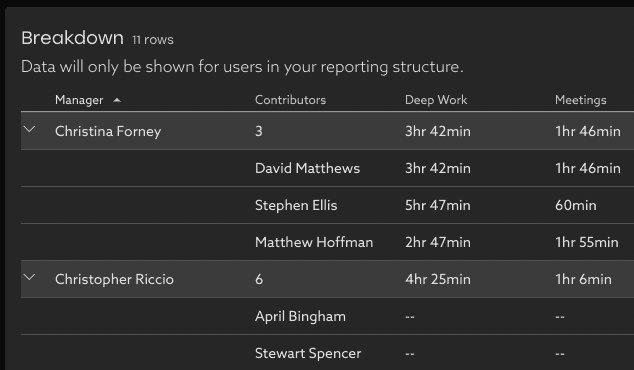
Data that is shown / not shown
- The daily average amount of Deep Work, short fragments, and distractions (Meetings and Interruptions) give a view of the overall amount of time available for focus.
- The high level categories of meetings (Working Sessions, 1:1, Scrum meetings, etc) are estimated and provide insight into the type of meetings that are demanding the most time.
- Not shown: the individual meeting details (meeting titles, meeting times, participants) are not made visible it these insights.
Organization experience options
Options are available to configure the experience to match your organization's goals and norms:
- The minimum team rollup size can be adjusted, which determines the smallest team where rollup information is visible to all.
- Individual level information about Deep Work and meeting categories can be made available based on the org chart reporting tree (the default experience), visible to all (for a totally open organization), or visible to none.
Contact support@uplevelteam.com to review the options and make any changes to these experience options for your organization.