How to find low Deep Work time

How to find low Deep Work time

Learn how to analyze and improve your organization's deep work. 

Uplevel categorizes your team's work into two buckets:

Notes

Development time, which consists of Deep Work and fragments. Optimized development time consists of as little fragments as possible. 

Non-development time - The various types of meetings and interruptions in Slack that pull your developers away from their most important work. 

Development Time

Deep Work Trend

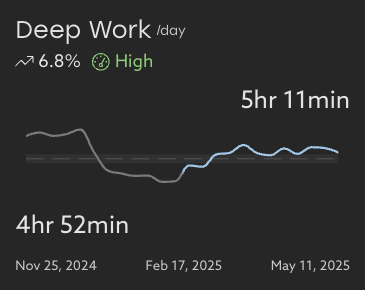
Understand your organization's Deep Work baseline by taking a look at your trends over time. This chart shows you the average time your developers have to focus over the selected time range, compared to the equal amount of time prior. 

This view makes it easy to spot dips which could correlate to an increased burnout risk.  
Clicking into Deep Work, you'll be able to see a breakdown of Deep Work compared to meetings, interruptions, and fragments.


An increase in fragments will correlate to a decrease in Deep Work.

Non-Development Time 

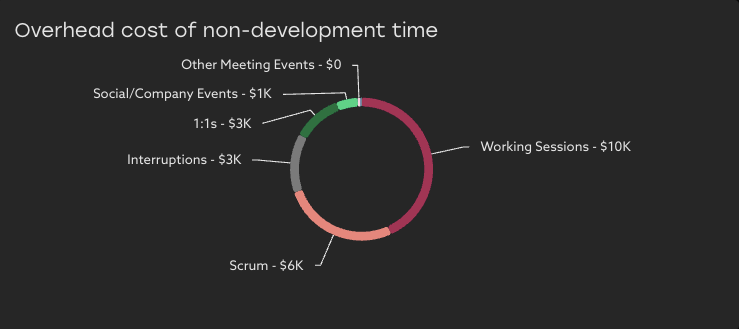
Under Deep Work, Uplevel also surfaces the overhead cost of non-development time (such as time spent in meetings and dealing with interruptions over Slack or Teams.) Private meeting events are always excluded from this calculation.  

Individual details where appropriate

Help your teams take action and make the needed improvements to meeting load and interruptions by focusing on where help is needed most.

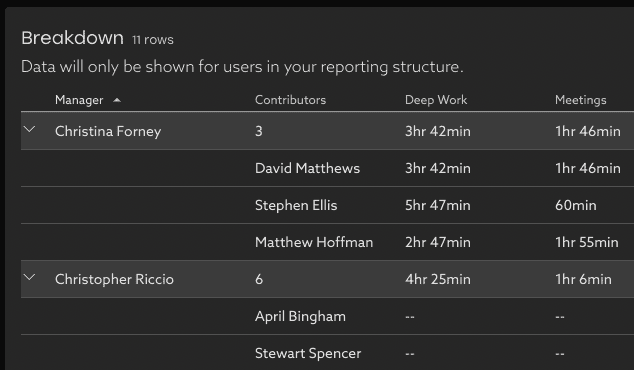
If your organization has enabled drill-ins to see individual details, these are available where appropriate within your reporting structure.

  • By default, individual level data is visible on those who report up to you.
  • Data about those who don’t report up to you is hidden, and only the team rollup is shown.

To enable these individual details or adjust your privacy settings, contact support@uplevelteam.com.

    • Related Articles

    • Deep Work

      What is Deep Work? Uplevel categorizes your team's work into two buckets: Development time - consists of deep work and fragments. Optimized development time consists of as little fragments as possible. Non-development time - The various types of ...
    • Uplevel Deep Work Playbook

      Learn about all things Deep Work with our step by step guide. Our team put together all our best Deep Work tips and tricks in our Deep Work Playbook. Download here.
    • How to use Uplevel to find velocity opportunities

      The first step towards increasing velocity is finding where your biggest opportunities lie. There are a variety of venues through which opportunities in velocity can be found. Note that affecting/changing velocity comes later, and can be explored in ...
    • How to decrease your team's unallocated time

      Tips and best practices to get a more complete picture of your organization's investments in Time Allocation Uplevel's Time Allocation metric combines signals from calendar, chat, project tracking (Jira) and version control systems (git) to estimate ...
    • Lead Time for Changes

      How does Uplevel define Lead Time for Changes? The DORA metric Lead Time for Changes is measured as the median duration of time from first commit until the Pull Request is deployed to a production environment using CI/CD Data. This differs from Cycle ...